Work with the assistant
Ask questions over your own data, hand off real work, and understand what it will and will not do without asking.
The assistant lives inside your workspace. It can read what you can read, build the same things you can build, and it leaves its answers in the workspace as things you can open.
Ask
Ask it what you would ask a well-informed teammate: “what did we decide about pricing?”, “which tasks are blocked on design?”, “summarise last week’s feedback”. It searches your pages, databases and files, answers with your own data as context, and cites the items it used as footnotes you can open.
It can also search the web when a question needs it, and it can look inside connected apps you have access to.
Do
Describe an outcome and it plans the steps:
- Create a database with fields, formulas and views, or add fields to one you have.
- Create pages, dashboards and automations.
- Create, update and duplicate records, and write into a record’s page.
- Run your actions.
- Browse and act in connected apps, within what the connection allows.
Everything it does is an ordinary change: visible at once and attributed to the assistant on your behalf. You can edit or remove anything it made, and a page it rewrote can be restored from version history. Things it created carry the violet mark so you can always tell.
When it asks first
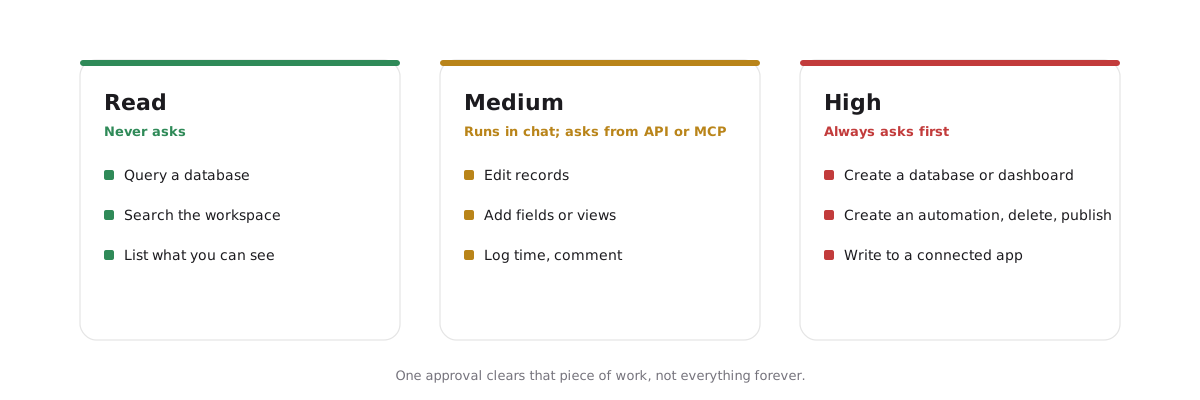
Each thing the assistant can do has a stake, and the stake decides whether it asks before acting:
| Stake | Examples | Behaviour |
|---|---|---|
| Read | Query a database, search, list the workspace | Never asks |
| Medium | Edit records, add fields or views, log time, comment | Runs in chat; pauses for approval when called from the API |
| High | Create a database, dashboard or automation; delete; publish; write to a connected app | Always asks |
You see exactly what it wants to do and approve or decline. One approval clears that piece of work, not everything forever. Agents connected through the MCP server follow their own client’s approvals instead (below).
Models and Auto
The model picker offers Auto and a catalogue of named models, each showing its speed, its strength, and how fast it uses your allowance. Auto is the default and the lower-cost route. On paid plans it has its own per-member allowance that refills every four hours, so everyday questions rarely touch the workspace’s monthly pool; on Free, Auto draws the pool directly. Picking a named model always draws on the pool. Your choice sticks per workspace.
Which models you can pick depends on the plan. The picker names the plan that unlocks a locked model.
Your allowance
The workspace shares one monthly AI pool, sized as a base plus an amount per seat. The billing page and the composer show it as a percentage remaining and roughly how many turns are left, priced at what your recent turns have cost. When the pool is spent, AI pauses until the next month; on paid plans an owner can add a prepaid top-up or turn on capped auto-refill. Nothing bills silently. Billing and plans has the numbers.
Chats
A chat belongs to the person who started it and picks up where it left off on any device. Dates in a chat resolve in your time zone. The composer at the bottom of every surface opens a chat in place, and ⌘K offers the current item’s actions and help.
Your own agents
The workspace is also reachable from agents you run yourself through the MCP server. They get the same tools and the same permissions as the assistant. Your MCP client decides whether to ask before each call: Snoze marks deletions and anything that leaves Snoze for confirmation, but a client set to approve everything won’t ask. To let an agent look without changing anything, connect it through the read-only address.