Connect Discord
Work with records, timers and forms from Discord, and post live panels to a channel.
The Snoze bot lets a team that lives in Discord read and change the workspace without leaving it: look up records, create them, run a timer or a shift, fill a form, and post panels that keep a channel up to date.
Install the bot
- In Snoze, open Workspace settings → Connected apps → Discord and click Connect server. You need the workspace’s integrations permission.
- Pick the Discord server. You need Manage Server on it, or to be its owner.
- Authorise the bot. Snoze checks that the bot landed in that server before it marks the connection live.
Link your own account
Each person links their Discord account to their Snoze account once. Run
/snoze account in Discord and follow the link; Discord confirms who you are
and Snoze ties it to the account you are signed in with. You need a Snoze
account already; the link fails with a note if you do not.
From then on, everything you do from Discord acts as you, with exactly your Snoze permissions.
Commands
| Command | What it does |
|---|---|
/snoze databases | List the databases you can see. |
/snoze view | Open a view and browse its records. |
/snoze record | Look up one record and its fields. |
/snoze create | Create a record in a database. |
/snoze search | Search the workspace. |
/snoze timer | Show, pause, resume or stop your personal timer. |
/snoze clock | Start a shift, take a break, or clock out. |
/snoze me | Your personal dashboard: your work and your time. |
/snoze inbox | Your notifications. |
/snoze panel, /snoze panels | Create a panel, or list the channel’s panels. |
/snoze workspace, /snoze status, /snoze account | Which workspace the server is connected to, the connection’s health, and your account link. |
Replies that are just for you expire after 15 minutes.
Panels
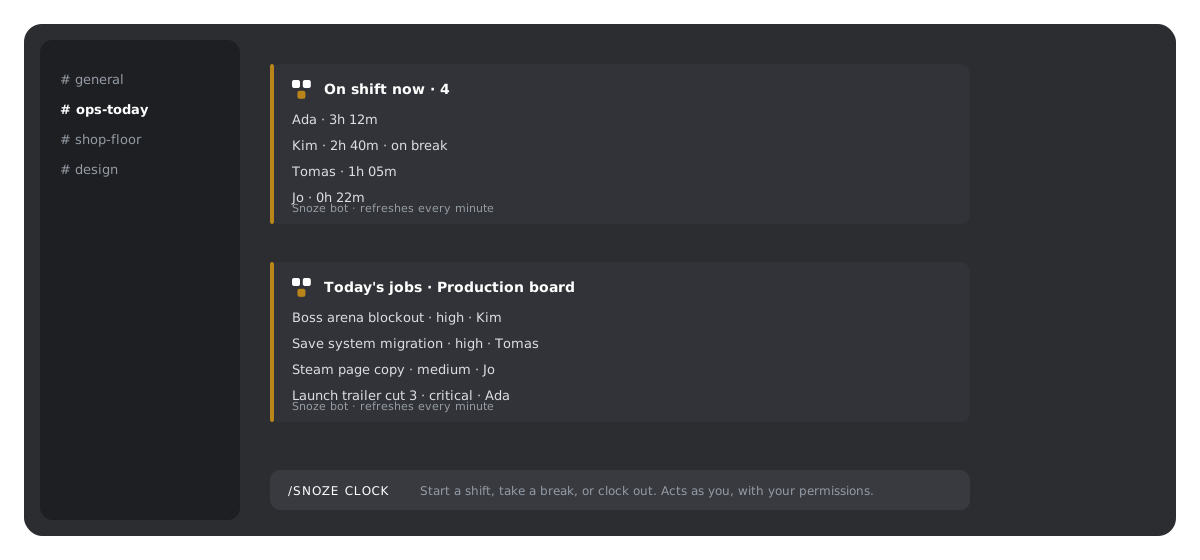
A panel is a message the bot posts to a channel and refreshes every minute. Four kinds:
- Clock: who is on shift right now and for how long. Up to 20 people.
- Records: a live snapshot of a database or view, up to 8 records, with a button to open one privately.
- Form: a prompt that collects submissions into a database.
- Me: a launcher for each member’s personal dashboard.
A panel renders with the permissions of the person who created it. When a member clicks into a record or a form from the panel, that part is private to them and uses their own permissions.
If the creator’s account link goes stale, or the database or form behind a panel is archived, the panel stops refreshing and turns itself off. Fix the cause and create it again.
Limits
- One Discord server connects to one workspace.
- Panels show at most 8 records and 20 shifts.
- Personal replies expire after 15 minutes.