Shifts and timesheets
Clock in and out, take breaks, and read the timesheet across the team.
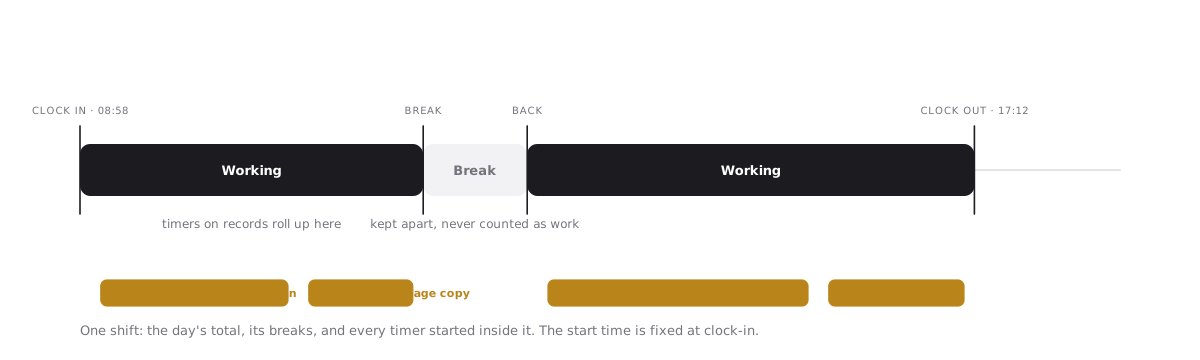
A shift brackets a working day. Operators clock in when they start, take breaks, and clock out at the end; the shift keeps the total and every timer started during it rolls up underneath. The timesheet adds it up per person and per record.
Shifts are built for people who run the work rather than build it: field staff, shop floor, support. They are free on every plan because Operators are never a paid seat.
Clock in and out
- Start your shift from the timer control in the top bar, or from
Discord with
/snoze clockif your workspace has the Discord bot. - Take a break the same way. A shift is either open, on break, or closed; break time is kept separately and never counts as work.
- Clock out when you are done. You can add a short note.
The shift’s start time is fixed when you clock in and is never recomputed, even if a timer you started runs past your clock-out.
Timers inside a shift
Any record timer you run while clocked in belongs to the shift. Stopwatch and pomodoro both work; entries you log by hand for that day count too.
The timesheet
The timesheet shows time by member and by record, for the range you pick. Your own time is always yours to read; reading the whole team follows the workspace permissions your role gives you.
- Entries carry a source: timer, manual, or imported.
- Every correction is kept as a revision (created, updated, reassigned, deleted) with who made it and why.
- Time revisions are kept for at least 90 days on every plan, longer where the plan’s history window is longer.
Time reports over the timesheet are a Team plan feature. See Billing and plans.
From Discord
With the Discord bot installed, /snoze clock starts a shift, takes a break,
or clocks out, and /snoze timer shows, pauses, resumes or stops your
personal timer. A clock panel posted to a channel shows who is on shift
right now and for how long. See Connect Discord.